A training plan that survives your actual week

It rebuilds next week from what you logged, what you skipped and which muscles haven't recovered yet. Built by one person with unpredictable hours. Free at launch.

Create a free account

Sign in

No credit card. Works on the web now; the iPhone and Apple Watch apps are in TestFlight.

The model drafts. Code checks. You decide. Details below.

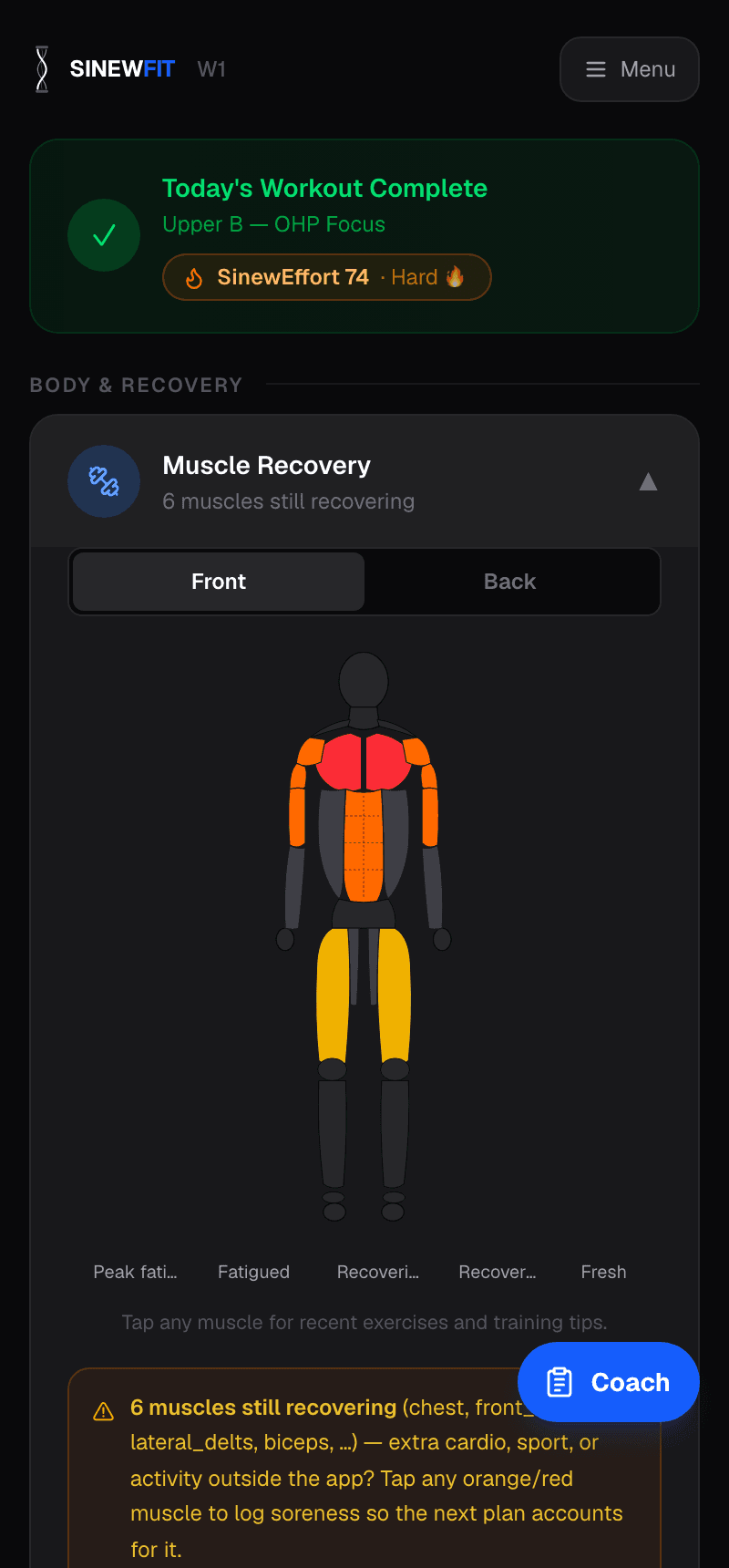
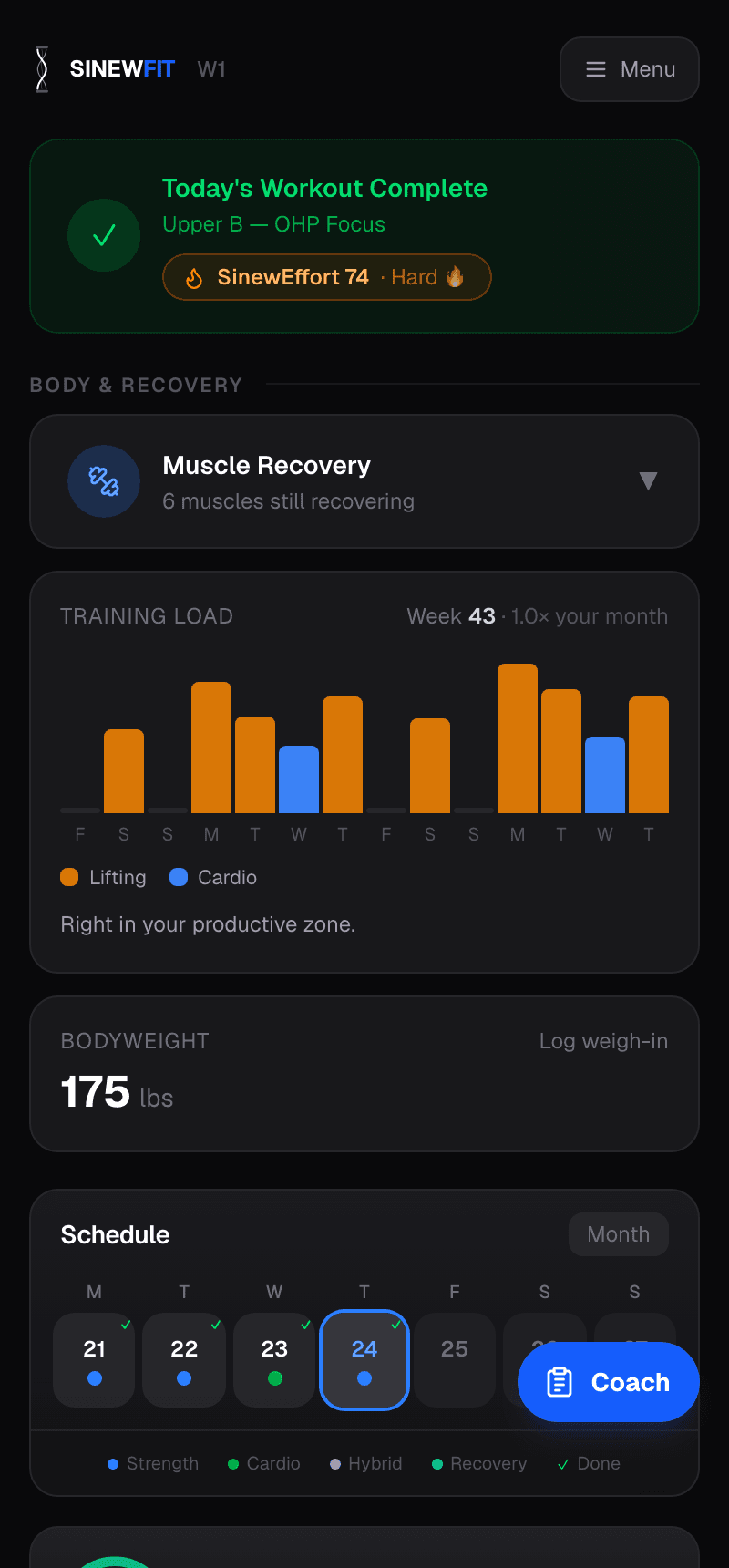
Dashboard showing today's workout and the muscle recovery map.

Why this exists

I work in professional services. The hours are unpredictable and I travel a lot. I've trained for years, run real programs, understood the science, and every plan I followed broke the moment my schedule changed.

Miss two days because of a deadline? The app doesn't care. Stuck in a hotel gym? Not the app's problem. Only free during nap time? Same program, same weights, same schedule that stopped fitting weeks ago.

So I built SinewFit. It writes next week from what actually happened, not what was supposed to happen. Skipped Tuesday, went harder than planned on Sunday, in a hotel Wednesday through Friday: the next week is built around that instead of pretending it didn't happen.

I made the first commit on March 31, 2026 and, as of September 24, 2026, have pushed code on 86 different days since. I train with it myself, and the last three weeks of fixes all came out of my own sessions. I hit legs hard on a Sunday and the regenerated week still put legs on Tuesday, so I built the recovery hold that stops that. My walking lunges showed one total weight when I was holding two dumbbells, so every dumbbell exercise now shows the weight per hand. I did a Peloton class and there was no clean way to record it, so now you can track an activity live, log it after, or pull it in from Apple Health.

This is one person's build, so it isn't finished. What's here is what I use. If something is wrong, write to me.

Sean, founder · support@sinewfit.ai
What happens when you ask for a week

There is a language model in the loop, and I'd rather explain exactly what it does than hide it. It writes the first draft of your week. Ordinary code, the kind that gives the same answer every time, checks and corrects that draft. After that the plan doesn't change on its own; every adaptation is a tap you make.

Here is what happens, in order.

1. It asks before it guesses

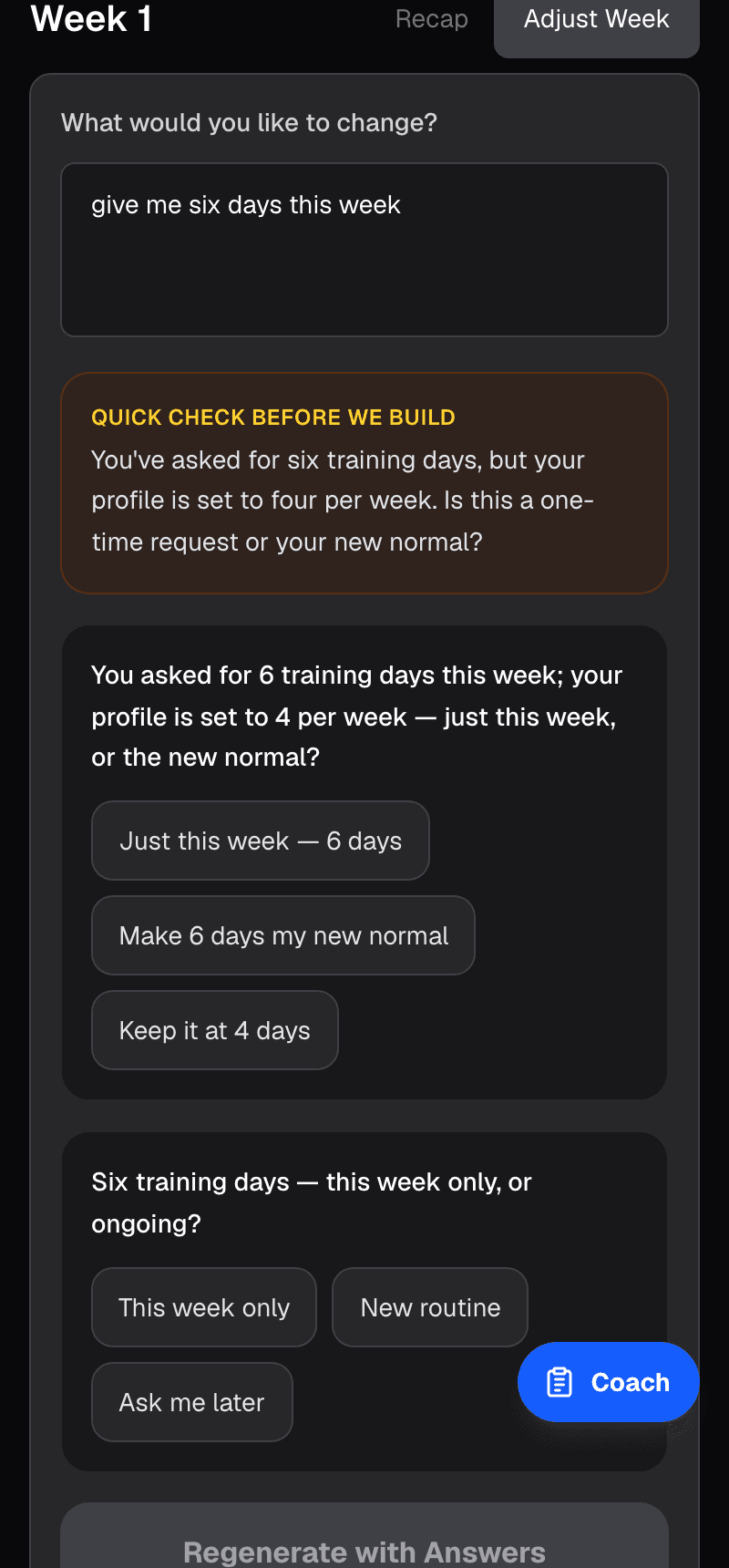
Before anything is built, a small check (a second, cheaper model call) reads your request against your facts: your tagged days, how often you normally train, which muscles are still inside a recovery window, whether a deload is due. If it finds a contradiction it asks a couple of short tappable questions, never more than three, instead of guessing. “Sunday is tagged rest. Train it anyway?” “Six days versus your usual three: this week only, or a new normal?” It never blocks the plan. If the check itself fails, the week still builds.

The pre-flight check asking whether six training days is a one-time request or the new normal.
The pre-flight check. A question before the build.

2. The draft

The model is handed your profile, your logged history, your current recovery state, your tagged days (rest, travel, a class you've already booked) and your equipment, and writes a week. It can only choose from a catalog of 296 exercises, each tagged with the muscles it works, the equipment it needs, its movement pattern, whether it's done one side at a time, and which injuries it is wrong for. It cannot invent an exercise, and it doesn't get the last word on any number.

3. Recovery is arithmetic, not a feeling

Each muscle gets a 24, 48 or 72-hour recovery window based on how many working sets it just did and how heavy they were. Nothing is held out past three rest days; after three, you're recovered. That model draws the recovery map you see each morning, and it is also what stops the draft from doing something dumb:

  • Readiness holds. Train legs hard on Sunday and legs can't lead a session until that window clears. The scheduler moves days to honor it.
  • Spacing. Forty-eight hours between hard hits of the same large muscle. When a generated day clashes with a day you've already completed, the other days get their dates swapped. The completed day is never touched.
The muscle recovery map, front view, with several muscles still recovering.
The recovery map. Each muscle on its own clock.

4. Every weight comes with a receipt

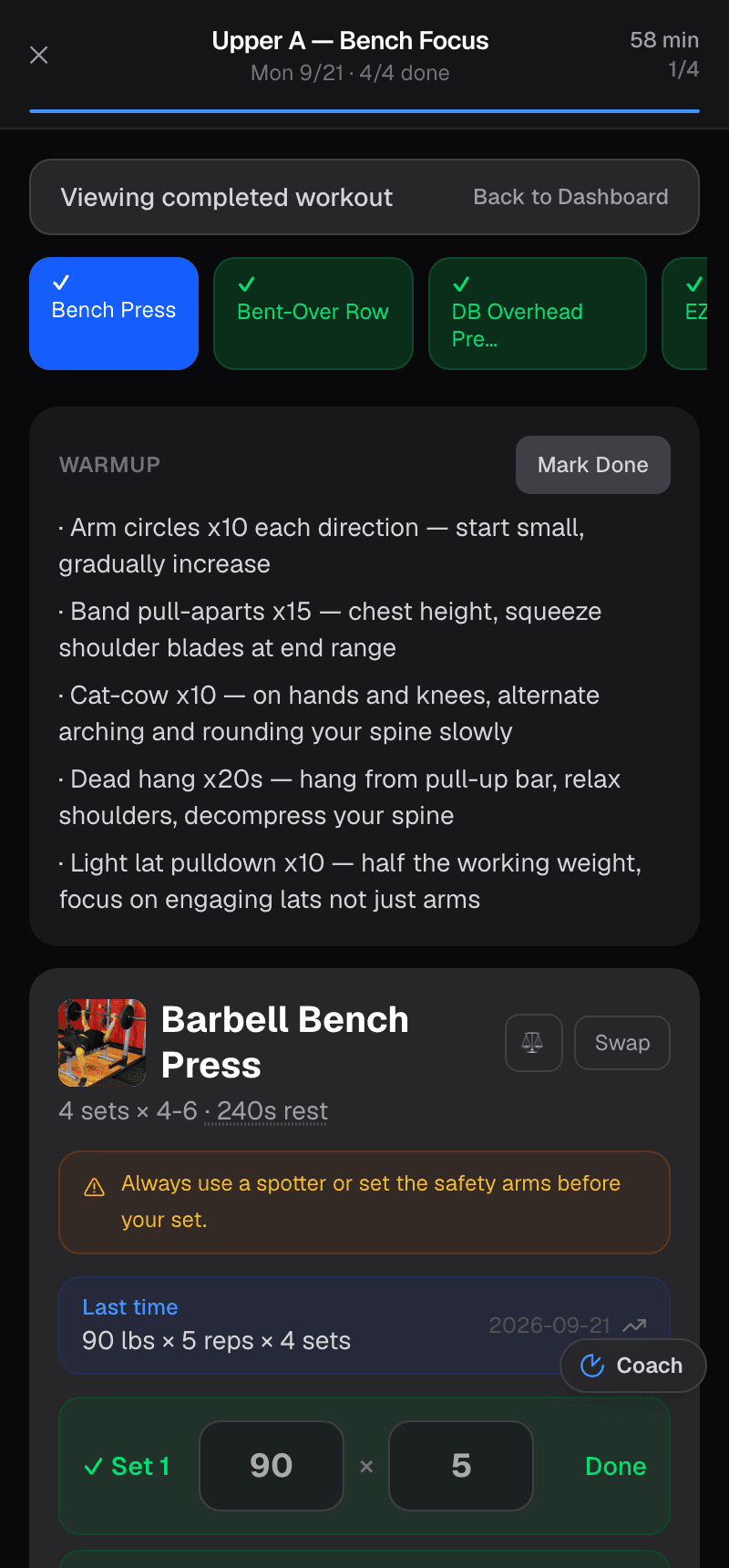
A prescribed weight comes from one of three places, in order: your own logged sets (an estimated one-rep max), a related lift you did log, or an estimate from your bodyweight. It's then snapped to plates and dumbbells that actually exist. Under each number is a written line saying which of the three it came from, so you can disagree with it on the merits. Dumbbell and kettlebell weights are per hand.

Rest comes from one table, your goal by the exercise's role in the session, reconciled into bands. Supersets and circuits stay at zero.

Deloads are detected from fatigue signals, block boundaries and layoffs, then offered as a check-in, not applied behind your back. You can say no. If you do, it remembers.

A logged bench press session showing the prescribed sets, rest and the weight from last time.
Logging a set. Last time’s numbers sit above the inputs.

5. It knows what your gym has

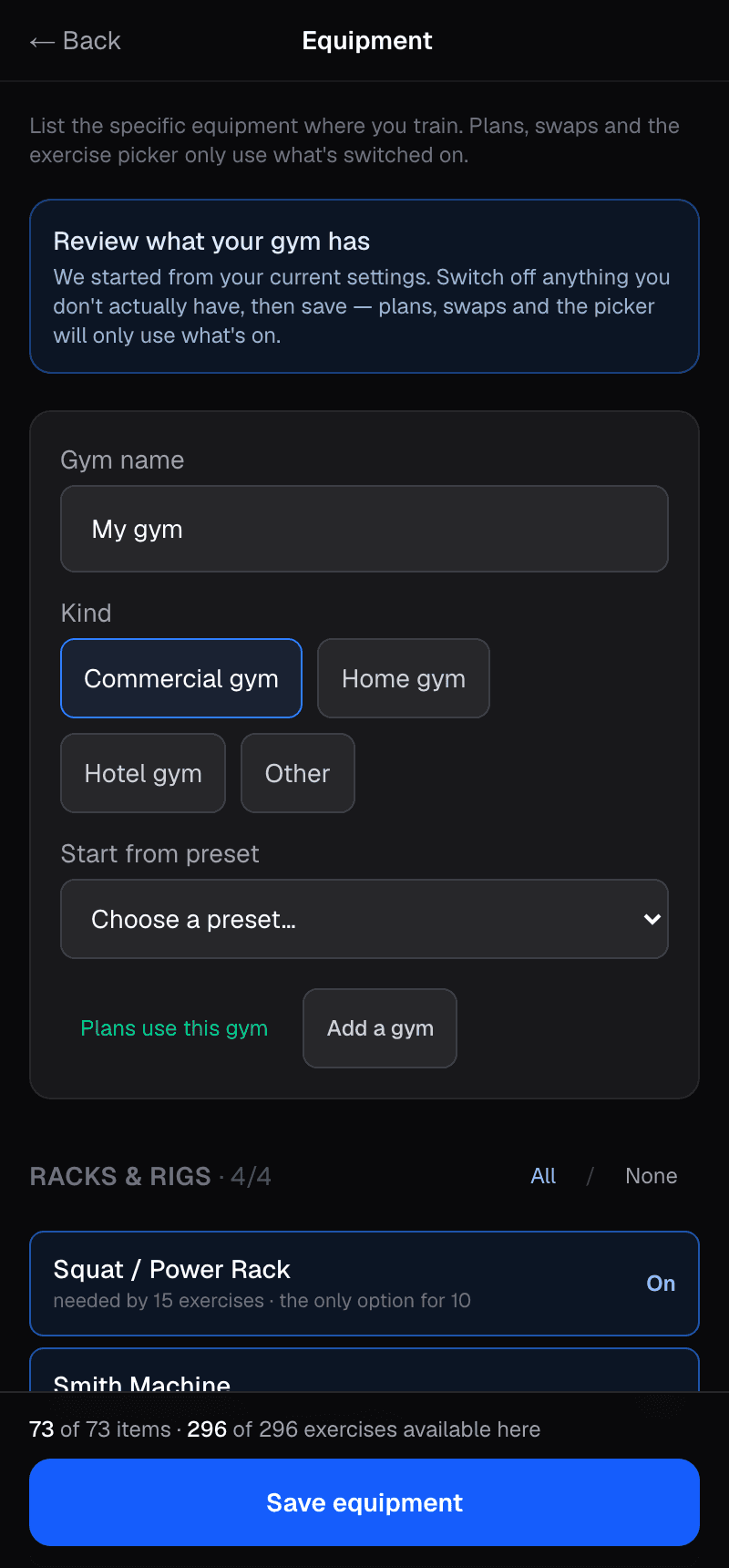
Seventy-four specific items in nine categories: racks and bars, benches, cable stations, upper-body machines, lower-body machines, free weights, bodyweight stations, bands and accessories, and cardio machines. Every exercise in the catalog is mapped to the combinations of items that make it doable. Map your gym once and the plan, the swap list and the exercise picker only offer what you can actually do. It replaced a set of coarse toggles that couldn't describe the gyms I was actually in.

The equipment tab with a gym named, its kind chosen and the rack items switched on.
The equipment tab. Tick what the room has.

6. Tradeoffs are written down

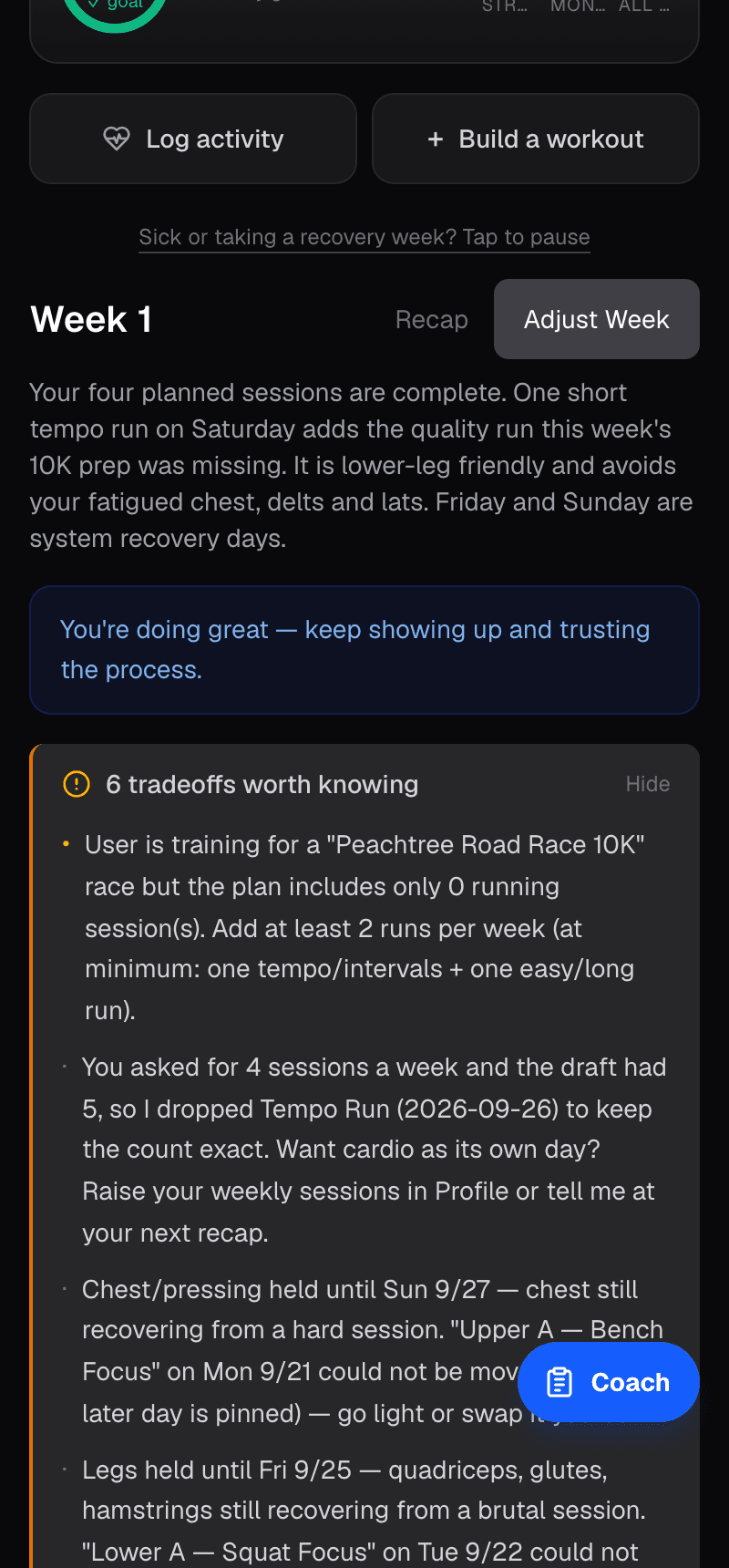
Sometimes the plan has to compromise: two sessions closer together than ideal, a rep scheme that leans away from your goal for a day, a superset that doesn't quite hold up, a sport that needs a minimum. When it does, the tradeoff is written on the week in plain words rather than buried. The week also draws a line between the planned days and anything you did after the week ended, because a one-off Sunday workout of mine once vanished under an ended week.

The week view with its tradeoff notes open, listing recovery holds and a dropped session.
The week, with its tradeoff notes open.

7. How I know it works

Twenty synthetic athletes run through the real pipeline whenever the planner changes: a beginner with only bodyweight, a home-gym fat-loss profile, a glute-focus profile, a powerbuilder, an advanced strength lifter, an older adult, someone training for an endurance event, a basketball player, a mobility profile, an injury-recovery profile, and others. Their plans are audited by code, not by eye. The pre-flight check runs fourteen of those profiles across fifteen request types, three rounds each. About 2,200 automated tests in 143 files run before every deploy.

And every plan generation writes a trace: which model ran, how many tokens, how long it took, and what the checks found. When a week comes out wrong I can find out why from data instead of guessing.

The rules, in one list
Pre-flight questions
A small check compares your request against tagged days, your usual frequency, recovery holds and deload status, and asks up to three tappable questions when something contradicts. It never blocks the plan.
The draft
A language model writes the first version of the week from your profile, logged history, recovery state, tagged days and equipment, choosing only from a catalog of 296 tagged exercises. That is all it does: draft.
Recovery windows
Each muscle gets a 24, 48 or 72-hour window based on how many working sets it did and how heavy. Everything is recovered after three rest days. This draws the recovery map.
Readiness holds
A muscle group trained hard can't lead a session before its window clears; the scheduler moves days rather than ignoring it.
Spacing
48 hours between hard hits of the same large muscle. Clashes with a day you already completed are fixed by swapping dates, not by touching the completed day.
Weight receipts
Every weight comes from your logged sets, a related lift you logged, or a bodyweight estimate, snapped to real plates and dumbbells, with a written line saying which. Dumbbells are per hand.
Rest
One table, goal by exercise role, reconciled into bands. Supersets and circuits stay at zero.
Deloads
Detected from fatigue signals, block boundaries and layoffs, then offered as a check-in. You can decline, and declining is remembered.
Equipment gate
74 items in 9 categories, every exercise mapped to the item combinations that make it doable. A mapped gym gates the plan, swaps and the picker.
Tradeoffs on the week
When the plan had to choose (spacing, rep scheme for your goal, whether a superset holds up, a sport's requirements), the tradeoff is written on the week in plain words.
Cardio targets
Zone and pace targets from your mile time and max heart rate; structured intervals; a Zone 2 session added when a week has none. On the Watch: heart rate, time in zone, GPS routes outdoors.
Tests and traces
20 synthetic athletes through the real pipeline, audited by code; about 2,200 automated tests before every deploy; a trace written for every plan generation.
You decide
Sleep, heart-rate variability and body weight from Apple Health can suggest an easier or harder day. Nothing changes until you tap it.

iPhone, Watch and web

The iPhone app has native set logging and a rest timer in the Dynamic Island. Wear an Apple Watch and the session runs on your wrist: live heart rate and time in zone, sets logged by tap or by voice (“80 for 5”), and a GPS route for outdoor runs and rides. Workouts are written back to Apple Health. The web app runs the same plans and logging with the same account.

Cardio gets targets too. Zone and pace targets come from your mile time and max heart rate, intervals are structured, and if a week has no cardio at all a Zone 2 session is added.

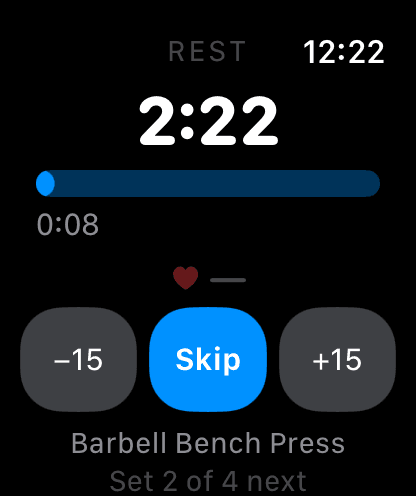
Apple Watch session showing live heart rate and the current set.
Apple Watch. Live heart rate, sets logged on the wrist.

The Watch is optional. The iPhone is the source of truth.

What this isn't

A few things you won't find here, on purpose.

  • No reviews, ratings, press logos or user counts. There aren't any to cite yet, so nothing is cited.
  • No claim that the model understands you. It writes a draft; the checks and the final say are not its job.
  • No changes made behind your back. Sleep, heart-rate variability and body-weight readings can suggest an easier day, but the plan only changes when you tap.
  • No selling your health data. Heart rate, the workouts written to Apple Health, and the readings used for readiness are used only to run the app: never sold, never shared for advertising, never given to a data broker. Details at /privacy.
  • No Watch required. The iPhone is the source of truth and everything works without one.
  • No credit card. Free at launch. When paid plans come, building a single day's workout stays free and any pricing change is announced in advance.
  • No Android yet.

Questions

How do I get started?

Create a free account, answer a few questions about how you train and what you have to train with, and your first week is ready in about a minute or two. Start on the web today; the iPhone and Apple Watch apps are in TestFlight and will use the same account.

Is it really free?

Yes. SinewFit is free at launch, full access, no credit card. When paid plans arrive, building day-by-day workouts stays free and any pricing change is announced well in advance.

Is this an AI app?

There is a language model in it. It writes the first draft of your week from your history, recovery state, tagged days and equipment, and a smaller call checks your request for contradictions before the build. Everything that has to be right, recovery windows, weights, rest, spacing, equipment, is decided by ordinary code I wrote and test, and every change to your plan is a tap you make. I don't claim the model understands you.

What if I disagree with the plan?

Swap the exercise; the swap list is limited to what your gym has. Decline a deload; it remembers that you did. When sleep or heart-rate data suggests an easier day, that's a suggestion with a button, not a change made for you.

Do I need an Apple Watch?

No. The iPhone is the source of truth and everything works without a Watch. With one, you get set logging on the wrist, live heart rate and time in zone, voice logging, and GPS routes for outdoor runs and rides.

What happens to my health data?

Heart rate from the Watch, the workouts written back to Apple Health, and the sleep, heart-rate variability and body-weight readings used for readiness are used only to operate the app. They are never sold, never shared for advertising, and never given to a data broker. The full policy is at /privacy.

Can I use it on the web?

Yes. Your account works on the web with the same plans and logging. The iPhone app is the flagship: native set logging, the Watch session, and a rest timer in the Dynamic Island.

What about Android?

Not yet. It's on the roadmap; iPhone, Apple Watch and the web come first.

Try it on a week that won't go to plan

Answer a few questions about how you train and what you have to train with. The week gets built, checked, and shown to you with its reasons. Your first week is ready in a minute or two.

Create a free account

Sign in

No credit card. Works on the web now; the iPhone and Apple Watch apps are in TestFlight.